创建MonoGame Windows Phone 8.0 库项目模板
MonoGame 目前最新版未提供Windows Phone 8.0 Library的项目模板,如果有需要可以手动新建模板。步骤如下:
1.新建WP8的Library项目
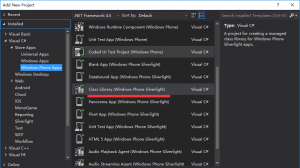
2.找到新建项目的.csproj文件,用记事本打开。找到第一个PropertyGroup节点,在节点中加入
<MonoGamePlatform>WindowsPhone8</MonoGamePlatform>
3.找到Import节点将下面代码替换掉Import节点
<ItemGroup>
    <!-- A reference to the entire .Net Framework and Windows SDK are automatically included -->
    <Reference Include="MonoGame.Framework" Condition=" '$(Platform)' == 'ARM' ">
      <HintPath>$(MSBuildProgramFiles32)\MonoGame\v3.0\Assemblies\WindowsPhone\ARM\MonoGame.Framework.dll</HintPath>
    </Reference>
    <Reference Include="MonoGame.Framework" Condition=" '$(Platform)' == 'x86' ">
      <HintPath>$(MSBuildProgramFiles32)\MonoGame\v3.0\Assemblies\WindowsPhone\x86\MonoGame.Framework.dll</HintPath>
    </Reference>
  </ItemGroup>
  <Import Project="$(MSBuildExtensionsPath)\Microsoft\$(TargetFrameworkIdentifier)\$(TargetFrameworkVersion)\Microsoft.$(TargetFrameworkIdentifier).$(TargetFrameworkVersion).Overrides.targets" />
  <Import Project="$(MSBuildExtensionsPath)\Microsoft\$(TargetFrameworkIdentifier)\$(TargetFrameworkVersion)\Microsoft.$(TargetFrameworkIdentifier).CSharp.targets" />
  <Target Name="MonoGame_RemoveXnaAssemblies" AfterTargets="ImplicitlyExpandTargetFramework">
  <Message Text="MonoGame - Removing XNA Assembly references!" Importance="normal" />
  <ItemGroup>
  <ReferencePath Remove="@(ReferencePath)" Condition="'%(Filename)%(Extension)'=='Microsoft.Xna.Framework.dll'" />
  <ReferencePath Remove="@(ReferencePath)" Condition="'%(Filename)%(Extension)'=='Microsoft.Xna.Framework.GamerServices.dll'" />
  <ReferencePath Remove="@(ReferencePath)" Condition="'%(Filename)%(Extension)'=='Microsoft.Xna.Framework.GamerServicesExtensions.dll'" />
  <ReferencePath Remove="@(ReferencePath)" Condition="'%(Filename)%(Extension)'=='Microsoft.Xna.Framework.Input.Touch.dll'" />
  <ReferencePath Remove="@(ReferencePath)" Condition="'%(Filename)%(Extension)'=='Microsoft.Xna.Framework.MediaLibraryExtensions.dll'" />
  </ItemGroup>
</Target>
