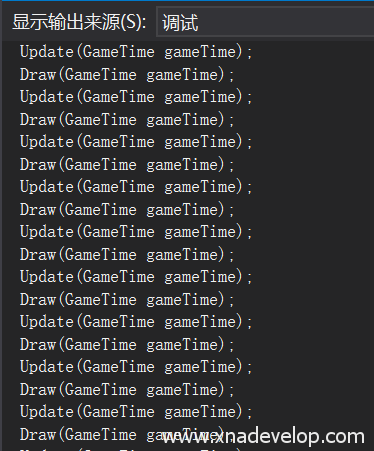
MonoGame同步更新Update和绘制Draw
用MonoGame开发游戏,游戏运行过程中Update和Draw通常是不同步的,Update的执行次数通常会多于Draw。如果需要Update和Draw保持同步即执行次数相同(Update一次Draw一次)只需要在游戏主函数Game1.cs的构造函数中加入:
IsFixedTimeStep = false;
graphics.SynchronizeWithVerticalRetrace = true;
完整代码:
using Microsoft.Xna.Framework;
using Microsoft.Xna.Framework.Graphics;
using Microsoft.Xna.Framework.Input;

namespace Game8
{
    /// <summary>
    /// This is the main type for your game.
    /// </summary>
    public class Game1 : Game
    {
        GraphicsDeviceManager graphics;
        SpriteBatch spriteBatch;

        public Game1()
        {
            graphics = new GraphicsDeviceManager(this);
            Content.RootDirectory = "Content";
            System.Console.WriteLine("Game1();");
            IsFixedTimeStep = false;
            graphics.SynchronizeWithVerticalRetrace = true;
        }

        /// <summary>
        /// Allows the game to perform any initialization it needs to before starting to run.
        /// This is where it can query for any required services and load any non-graphic
        /// related content.  Calling base.Initialize will enumerate through any components
        /// and initialize them as well.
        /// </summary>
        protected override void Initialize()
        {
            // TODO: Add your initialization logic here
            System.Console.WriteLine("Initialize();");
            base.Initialize();


        }

        /// <summary>
        /// LoadContent will be called once per game and is the place to load
        /// all of your content.
        /// </summary>
        protected override void LoadContent()
        {
            // Create a new SpriteBatch, which can be used to draw textures.
            spriteBatch = new SpriteBatch(GraphicsDevice);
            System.Console.WriteLine("LoadContent();");
            // TODO: use this.Content to load your game content here
        }

        /// <summary>
        /// UnloadContent will be called once per game and is the place to unload
        /// game-specific content.
        /// </summary>
        protected override void UnloadContent()
        {
            // TODO: Unload any non ContentManager content here
            System.Console.WriteLine("UnloadContent();");
        }

        /// <summary>
        /// Allows the game to run logic such as updating the world,
        /// checking for collisions, gathering input, and playing audio.
        /// </summary>
        /// <param name="gameTime">Provides a snapshot of timing values.</param>
        protected override void Update(GameTime gameTime)
        {
            if (GamePad.GetState(PlayerIndex.One).Buttons.Back == ButtonState.Pressed || Keyboard.GetState().IsKeyDown(Keys.Escape))
                Exit();

            // TODO: Add your update logic here
            System.Console.WriteLine("Update(GameTime gameTime);");
            base.Update(gameTime);


        }

        /// <summary>
        /// This is called when the game should draw itself.
        /// </summary>
        /// <param name="gameTime">Provides a snapshot of timing values.</param>
        protected override void Draw(GameTime gameTime)
        {
            GraphicsDevice.Clear(Color.CornflowerBlue);

            // TODO: Add your drawing code here
            System.Console.WriteLine("Draw(GameTime gameTime);");
            base.Draw(gameTime);


        }
    }
}